Payments Documentation
What is Payments?
With prices as low as 0.7%, Payments is the ideal solution for any website, mobile app, online store, classified site or marketplace that needs to take payments for any product or service of value. It allows buyers shopping online to make purchases safely and with confidence, whether they are spending $100 or $10,000,000 or more. Here is how it works:
- An online store or marketplace integrates the Payments API call on their listing or checkout pages. Since the store or marketplace only needs to implement a single API call, this can be done very easily.
- When the buyer checks out with Payments on the store or marketplace, a transaction is created on PROJECT_NAME and the buyer is redirected to the Payments wizard on PROJECT_NAME.
- The buyer secures their order by registering, verifying, and paying via the Payments wizard.
- All related actions and functionality for the transaction occur as usual.
Here is a screenshot of the Payments wizard that the buyer uses to make their payment:
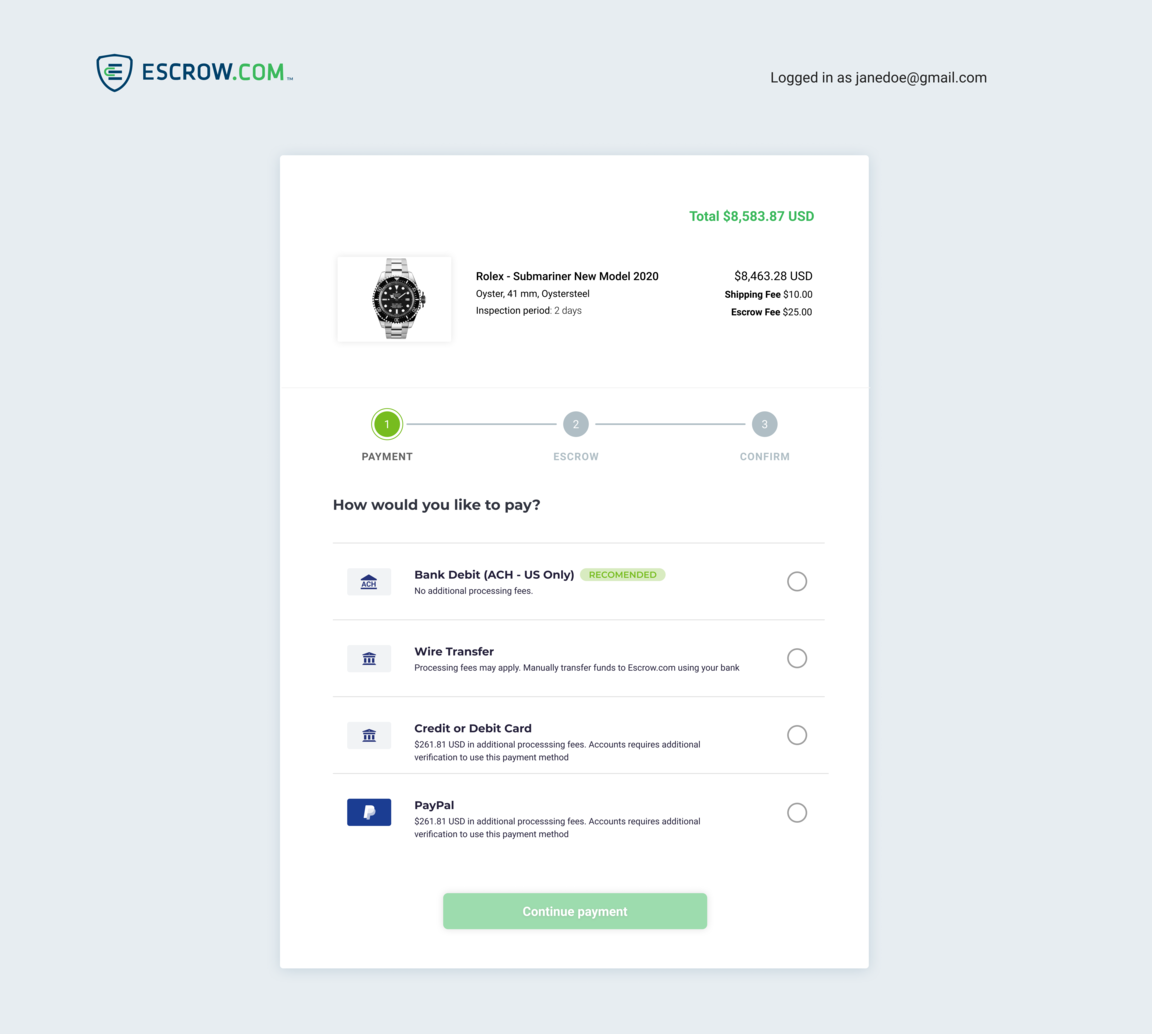
Learn more about Payments and its benefits here.
Calling the Payments API
The call to the Payments API specifies how the transaction should be configured. This includes details about the item(s) being transacted, the buyer, the seller, the terms of the transaction, and optionally a broker for marketplace or commission scenarios.
Note
The Payments API supports all the transaction configurations that are available in the create transaction endpoint in the Transaction API with the exception of Domain Name Holding transactions. However, there are two important changes: the customer object has been greatly expanded and the return_url attribute has been added. The customer object now allows the store or marketplace to pass relevant details such as the names, address, and date of birth of the buyer to PROJECT_NAME in the Payments API request. When a return_url is specified in the request, the buyer will be redirected to that url when they have completed the Payments wizard.
- cURL
- Python
- Ruby
- PHP
- C#
1 2 3 4 5 6 7 8 9 10 11 12 13 14 15 16 17 18 19 20 21 22 23 24 25 26 27 28 29 30 31 32 33 34 35 36 37 38 39 40 41 42 43 44 45 46 47 48 49 50 51 52 53 54 55 56 57 58 59 60 61 62 63 64 65 66curl "https://PROJECT_NAME/integration/pay/2018-03-31" \ -X POST \ -u "email-address:your-api-key" \ -H "Content-Type: application/json" \ -d ' { "currency": "usd", "description": "Perfect sedan for the snow", "reference": "test-transact", "return_url": "https://PROJECT_NAME", "redirect_type": "manual", "items": [ { "extra_attributes": { "make":"BMW", "model":"328xi", "year":2008 }, "fees": [ { "payer_customer": "me", "split": "1", "type": "protected transaction" } ], "inspection_period": 259200, "quantity": 1, "schedule": [ { "amount": 8000, "payer_customer": "john.wick@example.com", "beneficiary_customer": "me" } ], "title": "BMW 328xi", "type": "motor_vehicle" } ], "parties": [ { "address": { "line1": "180 Montgomery St", "line2": "Suite 650", "city": "San Francisco", "state": "CA", "country": "US", "post_code": "94104" }, "agreed": true, "customer": "john.wick@example.com", "date_of_birth": "1980-07-18", "first_name": "John", "initiator": false, "last_name": "Wick", "phone_number": "4155555555", "lock_email": true, "role": "buyer" }, { "agreed": true, "customer": "me", "initiator": true, "role": "seller" } ] }'
Example Response
1 2 3 4 5{ "landing_page": "https://PROJECT_NAME/pay?token=2d2afb9f-364f-4f9f-82a5-803344d60432", "token": "2d2afb9f-364f-4f9f-82a5-803344d60432", "transaction_id": 3300003 }
Locking the buyers email
Setting the lock_email value to trueremoves the ability for the buyer to edit their email address on the Payments sign up and login pages.
landing_page attribute
The landing_page attribute contains the link to which the buyer should be redirected.
token attribute
The token attribute contains the token which is used to identify the buyer's transaction on the the Payments wizard. While it is embedded in the landing_page, it is split out here for convenience.
transaction_id attribute
The transaction_id attribute contains the PROJECT_NAME transaction identifier for the transaction that was created by the call to the Payments API. This is provided so that subsequent calls may be made to the standard Transaction API.
For help on making API calls and configuring transactions, please review the links below.
Redirecting to your site after completing a transaction with Payments
Set the redirect_url to define the URL to return to after completion of Payments.
Modifying redirect behaviour
Set the redirect_type transaction property to control automatic redirects. A value of automatic will redircet automatically in 3-5 seconds, wheras a value of manual will only redirect the buyer if they click the call to action.
Retrieving a Pending Payments Transaction
A Pending Payments Transaction can be retrieved using the reference provided when creating the Payments transaction. This applies to all Payments Transactions that has a specific buyer.
- cURL
- Python
- Ruby
- PHP
- C#
1 2 3 4curl "https://PROJECT_NAME/integration/pay/2018-03-31?reference=test-transact" \ -X GET \ -u "email-address:your-api-key" \ -H "Content-Type: application/json" \
Example Response
1 2 3 4 5{ "landing_page": "https://PROJECT_NAME/pay?token=2d2afb9f-364f-4f9f-82a5-803344d60432", "token": "2d2afb9f-364f-4f9f-82a5-803344d60432", "transaction_id": 3300003 }
landing_page attribute
The landing_page attribute contains the link to which the buyer should be redirected.
token attribute
The token attribute contains the token which is used to identify the buyer's transaction on the the Payments wizard. While it is embedded in the landing_page, it is split out here for convenience.
transaction_id attribute
The transaction_id attribute contains the PROJECT_NAME transaction identifier for the transaction that was created by the call to the Payments API. This is provided so that subsequent calls may be made to the standard Transaction API.